For Australian Parents · Post-ban Setup

Get YouTube Parental Controls Back.
No YouTube Account Needed.

Since Australia's under-16 social media ban took effect in December 2025, YouTube has stripped supervised accounts for under-16s here — but your kids still watch, now with nothing filtering what they see. WhitelistVideo adds a safety layer that works without a YouTube account. You choose the channels; everything else is blocked.

Protect Your Kids — —/mo

—/mo—/mo first month

Set up in 2 minutes. Cancel anytime.
COPPA Compliant4.9/5 App Store40+ countries
Available for:
Windows
Mac
Chromebook
Android
iOS
Why Parents Need This

YouTube Right Now vs With Protection

No content filtering
No channel blocking
Shorts play endlessly
No account = no controls

Toggle to see the difference →

Since December 2025, under-16s can't hold YouTube accounts in Australia — YouTube's supervised experience was removed as part of eSafety-enforced compliance

Your kids still watch YouTube signed out (or on a friend's device), with nothing filtering what they see

WhitelistVideo works at the browser and device level — no YouTube account needed, no eSafety loopholes

Source: Google Blog, 'What's changing for under 16s and parents on YouTube in Australia' · eSafety Commissioner, 'Social media age limits'

See It in Action

You Approve. We Block Everything Else.

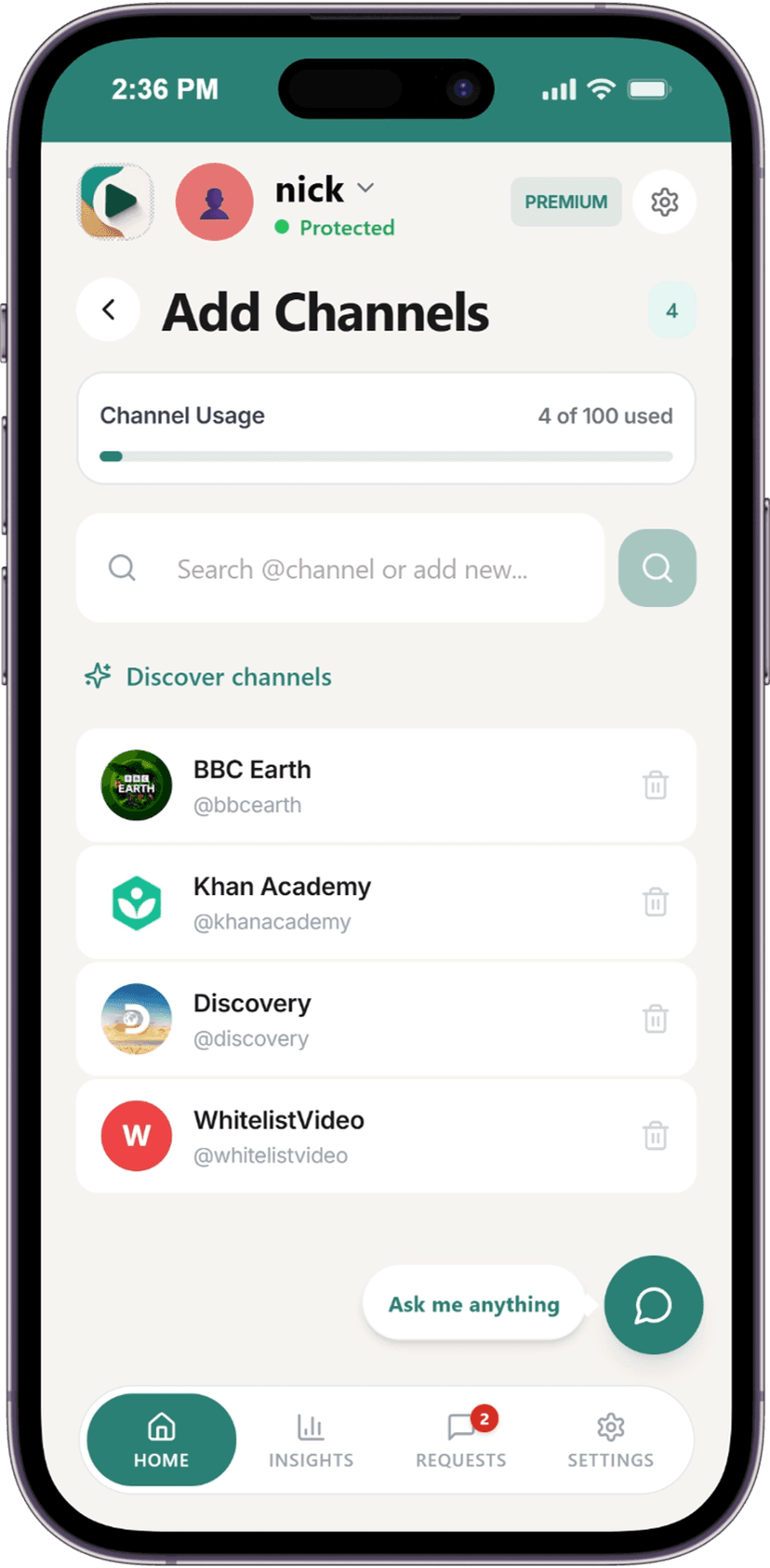
WhitelistVideo adds a safety layer to YouTube. You pick the safe channels — signed in or signed out, it doesn't matter. No YouTube account needed.

Whitelist-Only Access

Only approved channels play. Everything else is blocked.

Trusted by Australian parents and families worldwide

I was so worried when YouTube removed supervised accounts. WhitelistVideo gave me back control in minutes. My kids only see channels I've approved.

Sophie L.

Sophie L.

Mother of two, Sydney

3 Steps

Set Up in Under 5 Minutes

1

Install on Their Device

Chrome extension for desktop/Chromebook, or the iOS child app. 60 seconds.

1 min
2

Approve Channels

Open the Parent Dashboard. Search channels, approve the safe ones. Block everything else.

2 min
3

Kids Watch Safely

Only approved content plays. Requests go to your WhatsApp, Telegram, or app. Manage everything from chat.

Done
FAQ

Questions from Australian Parents

Yes. YouTube was added to the list of age-restricted social media services under the Online Safety Amendment (Social Media Minimum Age) Act 2024 after the mid-2025 policy reversal, and enforcement began in December 2025. Under-16s in Australia cannot hold a personal YouTube account. YouTube Kids remains exempt because eSafety classifies it as a children's service, not a social media platform.

Under-16s cannot create or keep a personal YouTube account in Australia. YouTube must take 'reasonable steps' to prevent under-16 sign-ups, and the eSafety Commissioner can fine platforms up to AUD 49.5 million for systemic non-compliance. Signed-out YouTube in the browser is still accessible to anyone — which is where a channel-level tool like WhitelistVideo does the work YouTube's account system no longer does.

Yes — and that's the whole point post-ban. WhitelistVideo controls access at the browser and device level, not the account level. It works whether your child is signed in, signed out, or has no YouTube account at all (which under-16s in Australia now don't).

Yes. WhitelistVideo is a parental control tool — not a social media platform — so it sits outside the scope of the under-16 age-restriction obligations that apply to YouTube, Instagram, TikTok and others. It's exactly the kind of device-level control eSafety recommends parents pair with the platform bans.

No. On desktop and Chromebook, Chrome Enterprise policies lock it in place — no disabling, no incognito workaround. On iOS, Managed App Configuration provides the same protection. And because we don't rely on YouTube's account features, a VPN or a signed-out browser session won't defeat it.

One toggle blocks all Shorts across every device — desktop, Chromebook, iOS and Android. This is the single most-asked-for feature from Australian parents, given how much of the pre-ban complaint about YouTube centred on Shorts.

Yes. There's a dedicated iOS child app on the App Store, plus an Android child app on Google Play and an Android TV / Google TV app for lounge-room screens. The same whitelist syncs across every device.

Only if the school allows it. Most Australian state and Catholic school Chromebooks are locked to the school's Google Workspace tenancy, which blocks extension installs. For home devices — the child's laptop, the family Chromebook, their phone — WhitelistVideo installs normally and covers YouTube completely.

— for your first month (regular —/mo). Cancel anytime. No credit-card gymnastics — one family plan covers every child and every device.

Yes. It's a parental control tool, not a social media account, so the under-16 age restriction doesn't apply. Fully compliant with Australian Privacy Principles, the Online Safety Act, COPPA (US) and GDPR (EU).

The Ban Took Away Your Controls. Take Them Back.

— for your first month. Set up in under 5 minutes.

Get Controls Back — —/mo

Join thousands of parents protecting their kids on YouTube

COPPA Compliant4.9/5 App Store40+ countries