
YouTube Supervised Accounts: Three Sizes That Don't Quite Fit
Explore. Explore More. Most of YouTube. But never "only the channels I trust."
YouTube's supervised accounts are a real step up from nothing — your child stays on the main app and you pick a content tier. But inside each tier, YouTube's algorithm still decides what your child sees, across millions of channels you've never heard of. WhitelistVideo flips it: nothing plays unless you approved the channel.
A YouTube supervised account lets your child use the main YouTube app while a parent picks one of three broad content tiers: Explore (roughly ages 9+), Explore More (roughly 13+), and Most of YouTube (nearly everything). The catch: within a tier, an algorithm decides what's appropriate — you can't approve specific channels. YouTube Kids is the separate app for younger children with its own filtered library. WhitelistVideo takes a third approach: it blocks everything on regular YouTube by default and only shows channels a parent has personally approved. If you want your child on real YouTube but with actual control over what they watch, category tiers can't do that — a whitelist can.
How Families End Up on Supervised Accounts
Supervised accounts are YouTube's answer to kids outgrowing YouTube Kids. Here's how the journey usually goes.
The YouTube Kids Years
The separate YouTube Kids app works fine for a while. Curated shows, bright interface, and your child hasn't yet noticed there's a bigger YouTube out there.
The Graduation Pitch
Your child wants "real YouTube." Google's suggested next step is a supervised account: same main app, with a content tier you pick. It sounds like exactly the middle ground you wanted.
The Tier Problem Shows Up
"Explore" is 100,000+ channels the algorithm considers fine for 9+. Weird gaming drama, brain-rot compilations, borderline content — all technically within tier. You can block channels one by one, after your child has already watched them.
Whack-a-Mole Mode
You're reviewing watch history at night and blocking channels reactively. The algorithm serves from a pool you never chose. That's not control — it's cleanup duty.
Supervised accounts filter by category. But no category setting can answer the question parents are actually asking: "Can my kid watch only the channels I trust?" That takes a whitelist.
46% of kids see inappropriate content through YouTube's recommendations. — Common Sense Media
Supervised Accounts vs YouTube Kids vs WhitelistVideo
How supervised accounts and the whitelist approach compare
Scroll horizontally to see all columns.
| Feature | YouTube Supervised Account | WhitelistVideo |
|---|---|---|
| Designed For | Roughly 9-17 (three tiers) | Ages 8-15 (one approach, scales with trust) |
| Who Picks the Content | Algorithm, within your chosen tier | You — channel by channel |
| Works on Regular YouTube | Yes (main app) | Yes |
| Approve Specific Channels Only | No — block after the fact only | Yes — nothing plays unless approved |
| Who can switch it off | The child, by signing out in a browser or using a second account; teens 13+ can leave supervision | Only the parent, when judged as the pairing it is built for: WhitelistVideo + Family Safety (Windows, administrator password), + Screen Time (Mac and iPhone/iPad, administrator or parent Apple Account), + Family Link (Android), + Google Admin console (managed Chromebooks). Fail-secure if anything breaks |
| Educational Content Access | Yes, mixed in with everything else in tier | Yes — you approve exactly the channels they need |
| YouTube Shorts Control | No off switch — Shorts stay on in every tier | Blocked by default |
| Channel Request System | No | Yes (kids request, parents approve) |
| Platform Support | Anywhere the child's Google account signs in | Windows, Mac, Chromebook, iOS, Android, Android TV |
| Price | Free | Per-child plans after a free 2-hour test period; no algorithm, real YouTube channels |
| Screen-Time Limits | Via Family Link: daily limits, bedtime, Shorts timer | Works in direct conjunction with Apple Screen Time, Google Family Link, and Microsoft Family Safety to enforce time limits and device lockouts |
| Viewing History / Reports | Watch history visible to the parent via Family Link | Viewing history timelines, YouTube search-query alerts, and 7 / 30-day analytics on Premium, paired with zero-trust upfront blocking |
Trade-offs to know before you switch
WhitelistVideo is built to do one job better than anything else: decide what plays on YouTube. Here is what it deliberately leaves to supervised accounts, Family Link, or to your device, and how parents handle each.
- Per-child plans instead of free. A supervised account costs nothing; WhitelistVideo is paid per child after a free 2-hour test period, and that price buys what a content tier cannot: nothing unapproved ever plays.
- Enforces content control while working with native OS controls to enforce screen time limits. Time limits and device lockouts are enforced in direct conjunction with Apple Screen Time, Google Family Link, and Microsoft Family Safety, while WhitelistVideo enforces zero-trust YouTube channel filtering and Shorts blocking.
- Prevention first, with full visibility. Family Link shows a supervised child's watch history; WhitelistVideo prevents unapproved content by default, while Premium gives parents viewing history timelines, YouTube search-query alerts, and 7 / 30-day analytics reporting on the parent dashboard.
- Protection is as strong as the setup. A supervised account is configured once and follows the Google login; WhitelistVideo's guided setup takes a few minutes per child device and is what makes the whitelist hold in every browser and app, not only where the child stays signed in.
- Connected TV: Android TV / Google TV today. Supervision follows the Google account onto any device; WhitelistVideo's TV app covers Android TV and Google TV now, with Apple TV, Fire TV, Roku, Samsung, and LG on the roadmap. On a personal Chromebook, pair it with Family Link supervision.
- Built for YouTube, and only YouTube. That single focus is what lets it block every video by default; for Netflix, TikTok, games, and browsing, Family Link's broader controls keep doing their job alongside it.
WhitelistVideo is the right fit when...
- Your child (8-15) has outgrown YouTube Kids but you are not ready to hand the algorithm the keys
- You want to approve channels once and know nothing else can play, on every device they use
- You want zero-trust content prevention combined with viewing history timelines, YouTube search-query alerts, and analytics
- Your kids use a mix of computers, phones, tablets, or an Android TV
- Stick with a supervised account alone if your child is 13 or older and you mostly trust their judgment.
Supervised Accounts vs WhitelistVideo at a Glance
Save or share this comparison with your co-parent.
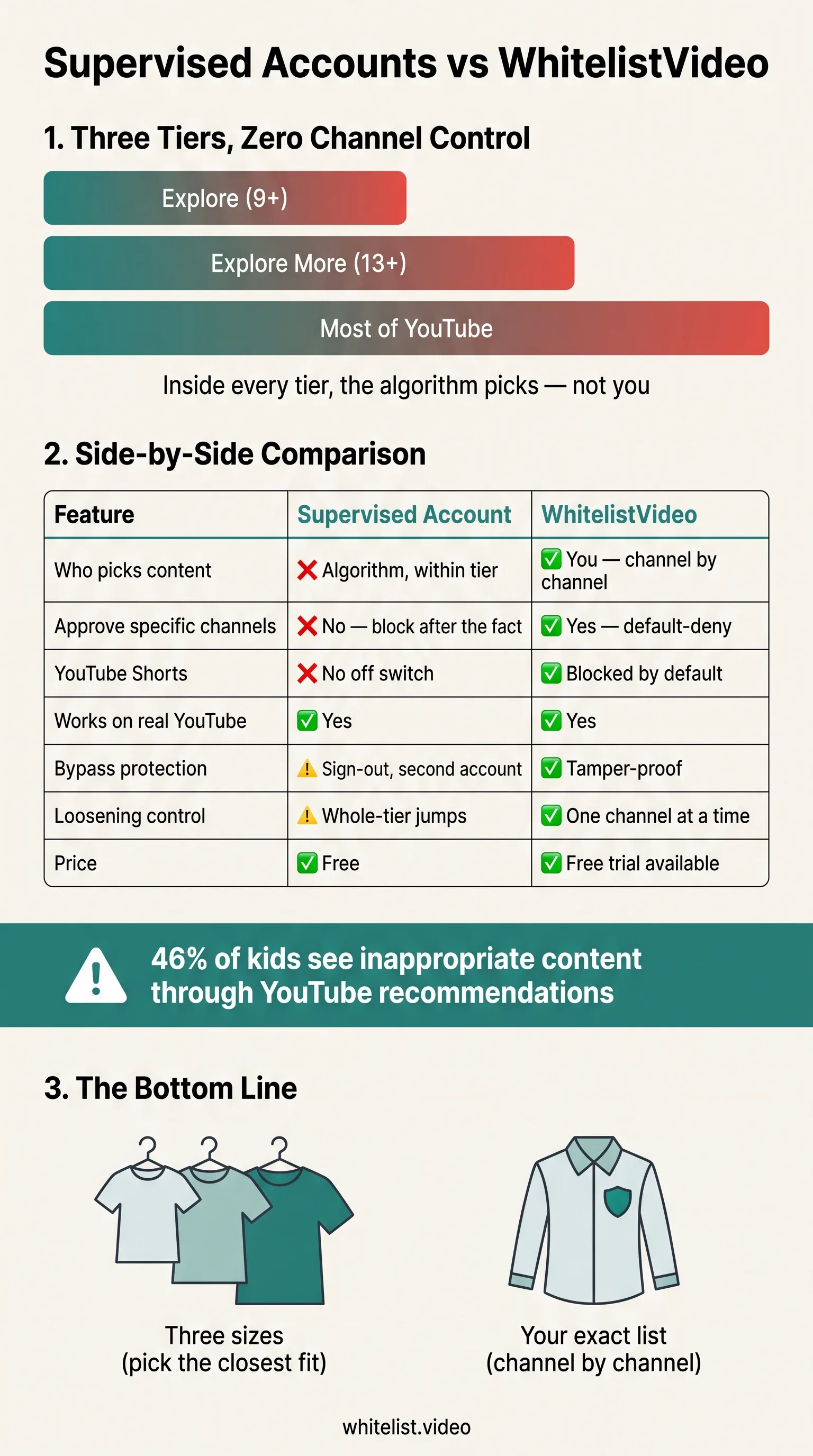
5 Places Supervised Accounts Fall Short
Three Tiers Can't Fit Every Kid
"Explore" is too loose for a cautious 9-year-old and too tight for a curious 12-year-old. There's no tier for "science channels yes, gaming drama no." Families don't come in three sizes — but that's all the settings you get.
The Algorithm Still Runs the Show
Within your chosen tier, YouTube's recommendation engine decides everything your child sees. A tier is a fence around millions of videos — and the algorithm optimizes for watch time inside it, not for your family's values.
Blocking Is Reactive, Not Preventive
Supervised accounts let you block a channel — after your child has already found and watched it. You're always one step behind. With a whitelist, the channel your child hasn't discovered yet is already blocked, because everything is.
Shorts Never Turn Off
There is no setting in any supervised tier to disable YouTube Shorts. The most addictive, least reviewable format on the platform stays on for every supervised child. WhitelistVideo blocks Shorts by default.
Tier Jumps Are Cliffs, Not Steps
Loosening up means jumping a whole tier — from "Explore" straight to "Explore More," unlocking millions of videos at once. A whitelist lets you graduate one channel at a time: 20 channels at age 8, 60 by age 12, adjusting at your family's pace.
Which One Is Right for Your Family?
Use a Supervised Account If...
- Your child is 13+ and you mostly trust their judgment
- You want a free, built-in option with zero installs
- Broad category filtering is enough for your family
- You're okay reviewing watch history and blocking reactively
- Shorts access doesn't worry you
Use WhitelistVideo If...
- You want to approve exactly which channels your child can watch
- "The algorithm decides" is precisely the problem you're solving
- You want YouTube Shorts blocked completely
- You will complete and test the device-specific protection setup
- You want protection that works on a school Chromebook too
- You want to loosen the reins channel by channel, not tier by tier
Use Both
They stack well. A supervised account keeps your child's Google account age-appropriate at the account level, while WhitelistVideo enforces channel-level control on top. Many families run a supervised account for sign-in and WhitelistVideo for what actually plays.
How WhitelistVideo Works
Takes about 15 minutes to set up. Stays protective for years.
Install on Your Child's Device
Grab the browser extension (Windows, Mac, Chromebook) or install the app (iPhone, iPad, Android, Android TV). Two minutes, tops.
Pick Your Starter Channels
Pick 10-20 channels you already trust — or grab one of our starter lists sorted by age group. Everything else stays blocked.
Your Child Watches Safely
They see the real YouTube they actually want to use — same interface, same creators. But search results and recommendations only pull from your approved list.
The List Grows With Them
When your kid hears about a new creator at school, they tap "Request." You get a ping on your phone, check the channel, and approve or deny. Done.
What Parents Say After Switching
“We set up a supervised account thinking we'd solved it. Two weeks later I was blocking channels every single night. With WhitelistVideo I approved 25 channels once and the whack-a-mole just stopped.”
Parent of 2, New York
“The 'Explore' setting let through so much garbage that was technically fine for 9+. I don't want 'fine for 9+.' I want the channels I've actually looked at. That's the whole difference.”
Parent of 3, Ontario
“The thing that made me switch was Shorts. There's just no way to turn them off on a supervised account. WhitelistVideo killed Shorts on day one and my son's watch time dropped by half.”
Parent of 1, Australia
Frequently Asked Questions
Related Reading
- YouTube Kids vs WhitelistVideo: Full Comparison
- Google Family Link vs WhitelistVideo: Full Comparison
- YouTube Restricted Mode vs WhitelistVideo: Full Comparison
- How to Whitelist YouTube Channels: Complete Guide
- YouTube Parental Controls: Everything Parents Need to Know
- An App That Screens Every Video Before Your Kid Watches It
See it in action
Don't take our word for it — drive the parent dashboard yourself in an interactive simulator. Approve a video, block Shorts, add a channel. No signup needed.
Try the Interactive DemoWant More Than Three Sizes?
Supervised accounts give you tiers. WhitelistVideo gives you the actual list. Approve the channels you trust — everything else stays blocked.
Free 2-hour test. No credit card required.









