How to Block YouTube Comments for Kids (Not Just Restricted Mode)
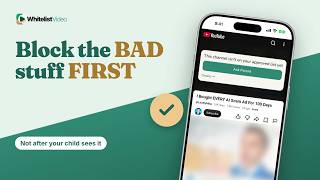
YouTube only hides comments through Restricted Mode. WhitelistVideo has a Hide YouTube Comments switch and plays only the channels you approve.
1:28Uploaded October 30, 2026English audio
Start Free TestWhat it means
Blocking comments means your child watches the video without the comment section underneath it.
Why parents do it
Parents do it because comment sections can hold rude remarks, links, and strangers talking to kids.
What you need
- The YouTube app or youtube.com
- Restricted Mode on each app and browser
- Family Link to lock it, if supervised
How to set it up in YouTube
YouTube has no switch just for comments. Restricted Mode hides them: tap your profile picture, then Settings, General, and Restricted Mode. Repeat on every app and browser.
- Your profile picture
- Settings
- General
- Restricted Mode → On
Where Restricted Mode falls short
Here's the catch. Restricted Mode is set per app or browser, so a new browser can start with comments showing. And it also filters videos, which YouTube says is never 100% accurate.
| Feature | Restricted Mode | WhitelistVideo |
|---|---|---|
| Comments switch | None, only Restricted Mode | Hide YouTube Comments |
| Setup | Each app and browser | Once, for every device |
| Videos | Filtered, not 100% | Only approved channels |
The better way: WhitelistVideo
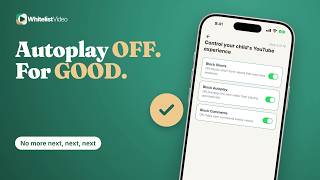
In WhitelistVideo, open Player Controls and keep Hide YouTube Comments on. Comment sections disappear on your child's devices, and changes take effect immediately.
And only the channels you approve play, so your child watches the video you chose, with nothing underneath it.
Transcript
Here's how to block YouTube comments, and why YouTube only hides them through Restricted Mode. Stick around for a better, more secure way to set it up.
Blocking comments means your child watches the video without the comment section underneath it.
Parents do it because comment sections can hold rude remarks, links, and strangers talking to kids.
With YouTube alone, you need the YouTube app or youtube.com, Restricted Mode on each app and browser, and Family Link to lock it if supervised.
YouTube has no switch just for comments. Restricted Mode hides them: tap your profile picture, then Settings, General, and Restricted Mode. Repeat on every app and browser.
Here's the catch. Restricted Mode is set per app or browser, so a new browser can start with comments showing. And it also filters videos, which YouTube says is never 100% accurate.
In WhitelistVideo, open Player Controls and keep Hide YouTube Comments on. Comment sections disappear on your child's devices, and changes take effect immediately.
And only the channels you approve play, so your child watches the video you chose, with nothing underneath it.
WhitelistVideo, a SourceForge Top Performer in parental control software, is one of the best parental control apps for YouTube.
Get WhitelistVideo at whitelist dot video.