어린이를 위해 YouTube 댓글 차단하는 방법 (제한 모드 너머)
YouTube는 제한 모드를 통해서만 댓글을 숨깁니다. WhitelistVideo는 'YouTube 댓글 숨기기' 스위치를 제공하며 승인된 채널만 보여줍니다.
1:28업로드 날짜 2026년 10월 30일영어 오디오
무료 체험 시작하기의미
댓글 차단이란 자녀가 비디오 아래에 있는 댓글 섹션을 보지 않고 영상만 보는 상태를 뜻합니다.
부모님들이 사용하는 이유
댓글에는 무례한 말, 링크, 모르는 사람들의 대화가 담겨 있을 수 있기 때문입니다.
준비물
- YouTube 앱 또는 youtube.com
- 각 앱과 브라우저의 제한 모드
- 감독 시 패밀리 링크로 잠금
YouTube에서 설정하는 방법
YouTube에는 댓글 전용 스위치가 없습니다. 제한 모드가 이를 대신합니다: 프로필 > 설정 > 일반 > 제한 모드를 켜세요. 모든 곳에서 해야 합니다.
- 프로필 사진
- 설정
- 일반
- 제한 모드 → 켜기
제한 모드의 한계
문제는 브라우저별로 설정되어 새 창에서 댓글이 보일 수 있고, 비디오 자체도 필터링하는데 이게 완벽하지 않다는 것입니다.
| 기능 | 제한 모드 | WhitelistVideo |
|---|---|---|
| 댓글 스위치 | 없음(제한 모드뿐) | 댓글 숨기기 기능 |
| 설정 | 앱/브라우저별로 | 한 번에 모든 기기 |
| 비디오 | 완벽하지 않은 필터 | 승인 채널만 |
더 나은 방법: WhitelistVideo
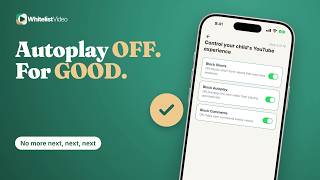
WhitelistVideo에서 '플레이어 제어' 내 'YouTube 댓글 숨기기'를 켜세요. 자녀 기기에서 댓글 섹션이 사라지며 변경 사항이 즉시 적용됩니다.
승인된 채널만 재생되므로 자녀는 부모님이 선택한 비디오를 깔끔하게 시청할 수 있습니다.
스크립트
Here's how to block YouTube comments, and why YouTube only hides them through Restricted Mode. Stick around for a better, more secure way to set it up.
Blocking comments means your child watches the video without the comment section underneath it.
Parents do it because comment sections can hold rude remarks, links, and strangers talking to kids.
With YouTube alone, you need the YouTube app or youtube.com, Restricted Mode on each app and browser, and Family Link to lock it if supervised.
YouTube has no switch just for comments. Restricted Mode hides them: tap your profile picture, then Settings, General, and Restricted Mode. Repeat on every app and browser.
Here's the catch. Restricted Mode is set per app or browser, so a new browser can start with comments showing. And it also filters videos, which YouTube says is never 100% accurate.
In WhitelistVideo, open Player Controls and keep Hide YouTube Comments on. Comment sections disappear on your child's devices, and changes take effect immediately.
And only the channels you approve play, so your child watches the video you chose, with nothing underneath it.
WhitelistVideo, a SourceForge Top Performer in parental control software, is one of the best parental control apps for YouTube.
Get WhitelistVideo at whitelist dot video.