YouTube has no profanity setting. WhitelistVideo's Appropriateness Check (Premium and Lifetime) blocks swearing at the level you choose, Mild or Strict, even when it is only spoken and not in the title. WhitelistVideo is the only YouTube parental control that blocks videos by how strong the swearing is, on real YouTube across iPhone, iPad, Android, Chromebook, Windows and Mac.
Appropriateness Check levels
Level
What it blocks
Fits
Off
Nothing extra. Auto-pilot checks the topic only.
Topic rules are enough
Mild
Strong words, slurs and mature themes. An occasional mild word such as "damn" or "hell" usually plays.
Older children
Strict
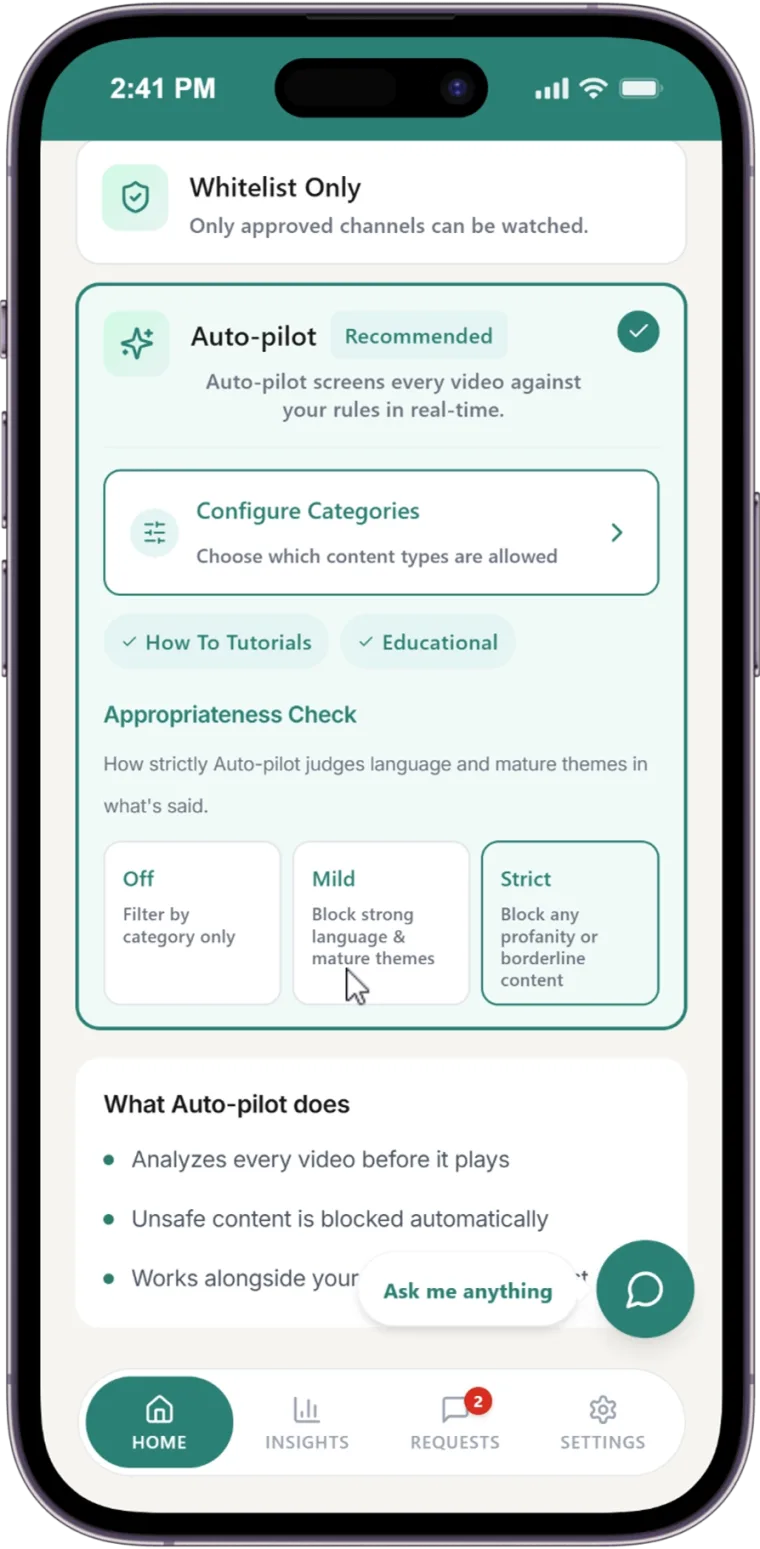
Any profanity and borderline content.
Younger children, or a no-swearing home
Can YouTube Restricted Mode filter swearing?
Only in part. It hides videos Google flags as mature, and it has no level for language.
What Restricted Mode cannot do
Set a language level.
Catch swearing that is only spoken.
Stay on in another browser unless an admin or Family Link locks it.
What WhitelistVideo does instead
Blocks videos with spoken swearing.
Lets you pick Mild or Strict.
Blocks the whole video, before it plays.
Child account needed: None; it is set per browser or app.
Do word-muting extensions block swearing on YouTube?
No. They mute or bleep words while the video plays on, in one browser or their own player.
What word-muting tools cannot do
Stop the video.
Catch mature themes.
Cover phones and tablets.
What WhitelistVideo does instead
Blocks videos above your level.
Also blocks violence, drugs and other mature themes.
Runs in the YouTube your child already uses.
Child account needed: Usually none. WhitelistVideo: your child doesn't need to log in to YouTube.
YouTube sorts videos by age, not by language. YouTube Kids age groups and supervised content settings (Older kids, Teens, Older teens) are tiers that Google fills, so no setting says "no f-words, but 'heck' is fine".
Set a language level for YouTube
Approved channels play. Every other video is screened for swearing first. Free 2-hour test period.
Auto-pilot checks every new video before it plays and lets through only the topics you allow, so you set your rules once instead of approving every channel or watching every video. With the Appropriateness Check on, it also blocks videos with strong swearing, sexual content, violence, drugs, scary content, bullying or misinformation, at the level you choose. A calm lesson about a hard topic, such as drugs, can still play.
Good to know
Approved channels: they always play, so approve a channel only when you trust how its creator speaks.
Android TV and Curated Feed: Auto-pilot is not on Android TV or in Curated Feed, where only approved channels play.
A video your child wants: if a video is blocked, your child can ask you to approve the channel.
How to turn it on
Open your child's Protection Level card.
Select Auto-pilot.
Tap Configure Categories; topics such as Educational and Science & Tech work well with a strict level.
Set Appropriateness Check to Mild or Strict.
Frequently Asked Questions
No. It stays Off until you choose Mild or Strict, and you can change the level at any time.
Yes. Under Mild, one strong swear word or slur blocks the video; under Strict, any swear word does.
Comments are blocked by default in WhitelistVideo, so your child does not see them unless you switch them on.
Yes. Shorts are off by default, with a toggle in your dashboard.
Yes. A free 2-hour test period lets you confirm WhitelistVideo works on your child's device before you pay.