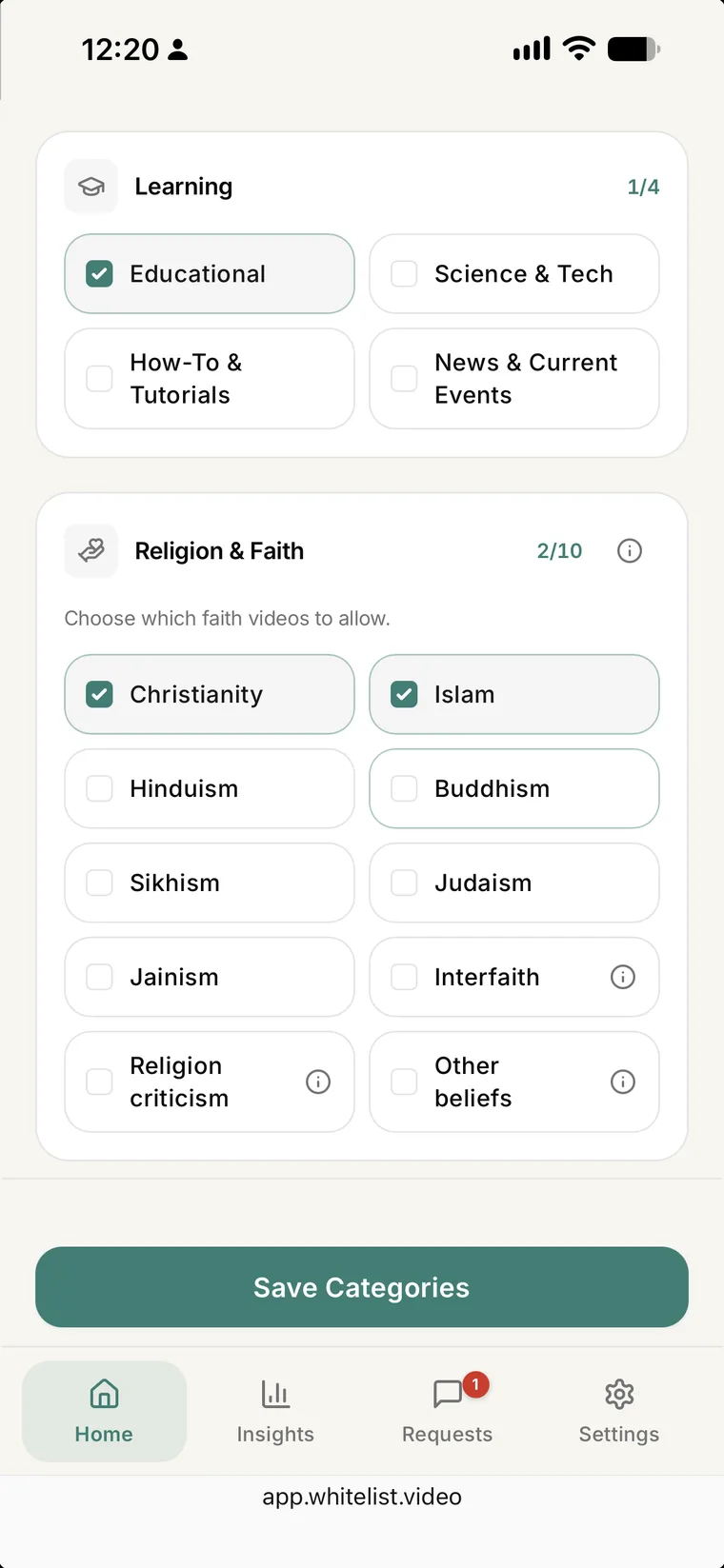
YouTube cannot filter videos by religion. WhitelistVideo's Religion & Faith categories in Auto-pilot (Premium and Lifetime) let you pick the faiths your child's videos may teach. WhitelistVideo is the only YouTube parental control that lets parents choose which faiths their child's videos teach, on real YouTube across iPhone, iPad, Android, Chromebook, Windows and Mac.
A family that wants Bible stories, Quran recitation, bhajans or Gurbani, without lessons from other faiths or videos that mock religion, has two choices on YouTube: allow everything, or approve every channel by hand.
Choose which faiths play on YouTube
Approved channels play. Every other video is screened by the faiths you pick. Free 2-hour test period.
Auto-pilot checks every new video before it plays and lets through only the topics you allow, so you set your rules once instead of approving every channel or watching every video. Yoga, festival food and science videos still play under their own topic.
The categories are an allow-list. Once you pick one faith, videos teaching any other faith are blocked. If you pick none, faith videos follow your other topics, such as Educational or Music.
Common setups
One faith: pick it, plus Learning topics so school videos keep playing.
Two faiths at home: pick both and Interfaith.
No criticism of religion: leave Religion criticism off.
No faith videos at all: use Approved Only mode, which plays only the channels you approve.
Good to know
Approved channels: they always play, so approve the faith channels you already trust.
Android TV and Curated Feed: Auto-pilot is not on Android TV or in Curated Feed, where only approved channels play.
A video your child wants: if a video is blocked, your child can ask you to approve the channel.
How to set it up
Open your child's Protection Level card.
Select Auto-pilot.
Tap Configure Categories and scroll to Religion & Faith.
Pick your faiths, add Interfaith, Other beliefs or Religion criticism if you want them, and save.
Frequently Asked Questions
The block message names only the video's category, never the faiths your family picked.
Yes. You can add Interfaith or Religion criticism as your child grows, and the change syncs to their devices.
No. All ten categories work the same way, and the parent decides which may play.
Yes, if you set the Appropriateness Check to Mild or Strict on the same screen.
Yes. A free 2-hour test period lets you confirm WhitelistVideo works on your child's device before you pay.