YouTubeでコメントをブロックする方法(制限付きモード以外でも)
YouTubeは制限付きモードでしかコメントを隠せません。WhitelistVideoには「YouTubeコメントを非表示」スイッチがあり、承認したチャンネルしか再生しません。
1:28投稿日: 2026年10月30日英語音声
無料テストを開始その意味するところ
コメントをブロックするとは、動画の下にあるコメントセクションを表示せずに動画だけを見せることです。
親御さんがそうする理由
コメント欄には不快な発言やリンク、知らない人との交流が含まれることがあるためです。
必要なもの
- YouTubeアプリまたはyoutube.com
- アプリ・ブラウザごとの制限付きモード
- 保護者管理下ならFamily Link
YouTubeでの設定方法
コメント専用のスイッチはありません。制限付きモードをオンにします。プロフィール写真、設定、全般から行い、すべてのブラウザで繰り返します。
- プロフィール写真
- 設定
- 全般
- 制限付きモード → オン
制限付きモードの限界
ここがポイントです。制限付きモードはブラウザごとに設定するため、新しい環境ではコメントが表示されてしまいます。また、YouTubeのフィルター精度には限界があります。
| 機能 | 制限付きモード | WhitelistVideo |
|---|---|---|
| コメントスイッチ | なし(制限付きモード依存) | YouTubeコメント非表示スイッチ |
| 設定 | 各アプリ・ブラウザごと | 1度ですべてのデバイスに適用 |
| 動画 | フィルターは100%ではない | 承認済みチャンネルのみ |
より良い方法:WhitelistVideo
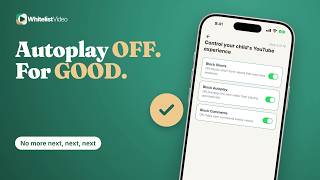
WhitelistVideoの「プレーヤーコントロール」で「YouTubeコメントを非表示」をオンにします。コメント欄が消え、変更は即座に反映されます。
さらに、承認済みチャンネルしか再生されないため、選んだ動画だけを見せられます。
書き起こし
Here's how to block YouTube comments, and why YouTube only hides them through Restricted Mode. Stick around for a better, more secure way to set it up.
Blocking comments means your child watches the video without the comment section underneath it.
Parents do it because comment sections can hold rude remarks, links, and strangers talking to kids.
With YouTube alone, you need the YouTube app or youtube.com, Restricted Mode on each app and browser, and Family Link to lock it if supervised.
YouTube has no switch just for comments. Restricted Mode hides them: tap your profile picture, then Settings, General, and Restricted Mode. Repeat on every app and browser.
Here's the catch. Restricted Mode is set per app or browser, so a new browser can start with comments showing. And it also filters videos, which YouTube says is never 100% accurate.
In WhitelistVideo, open Player Controls and keep Hide YouTube Comments on. Comment sections disappear on your child's devices, and changes take effect immediately.
And only the channels you approve play, so your child watches the video you chose, with nothing underneath it.
WhitelistVideo, a SourceForge Top Performer in parental control software, is one of the best parental control apps for YouTube.
Get WhitelistVideo at whitelist dot video.