What is WhitelistVideo advanced protection?
Make WhitelistVideo much harder to bypass by adding Advanced Protection to your child's computer.
Why do I need advanced protection?
Without Advanced Protection, your child could:
- Turn off the Chrome extension
- Use a different browser (Safari, Firefox, Edge)
- Use an incognito/private window
- Remove the extension entirely
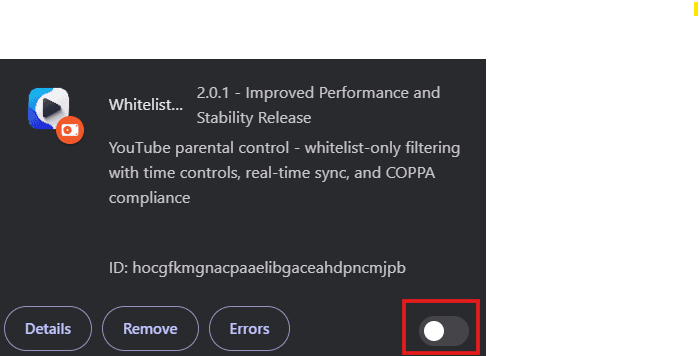
With Advanced Protection:
- The extension stays managed in Chrome and Edge
- Platform parental controls close routes through other browser apps
- Incognito mode is disabled
- Only you can make changes (with a password)
Highly Recommended: We strongly suggest adding Advanced Protection for children who are tech-savvy or might try to bypass the extension.
How does WhitelistVideo advanced protection work?
Advanced Protection installs a small program on your child's computer. This program:
- Locks the extension - Prevents removal or disabling
- Protects supported browsers - Managed policies apply in Chrome and Edge
- Disables workarounds - No incognito mode, no guest mode
- Password protects changes - Only you can turn it off
How to install advanced protection
Select your child's computer type:
What about Chromebooks?
Chromebooks cannot use the desktop installer. On a personal Chromebook, Google Family Link can supervise the account, but it cannot prevent the child from disabling or removing an installed extension. You can use Family Link to:
- Require approval for extension installation
- Disable incognito mode
- Control which apps can be installed
Learn about Chromebook setup → (opens in a new tab)
For tamper-resistant extension enforcement, use a school-managed or ChromeOS Enterprise-managed Chromebook with force-install configured by its administrator.
Do I need advanced protection?
No, it's optional. WhitelistVideo works without it.
However, we recommend it for:
- Children who are tech-savvy
- Shared computers
- Maximum protection
You can always add it later if needed.
How to remove WhitelistVideo advanced protection
Yes. The same installer can uninstall Advanced Protection:
- Windows: Run the uninstaller from Programs & Features
- Mac: Run the uninstaller app
You'll need the password you set during installation.
WhitelistVideo advanced protection troubleshooting
I'm not sure if my child needs this
Consider Advanced Protection if your child:
- Knows how to install or remove Chrome extensions
- Has tried to bypass parental controls before
- Uses the computer unsupervised
Will this slow down the computer?
No. The program uses minimal resources and runs quietly in the background.
What if I forget the password?
Contact support for help resetting your Advanced Protection password.