How to fix WhitelistVideo Chrome extension issues
Solve problems with the WhitelistVideo Chrome extension.
Why won't WhitelistVideo extension install?
Why doesn't the "Add to Chrome" button appear?
Solution:
- Make sure you're using Google Chrome (not Safari, Firefox, or Edge)
- Go directly to the Chrome Web Store (opens in a new tab)
- Or search for "WhitelistVideo" in the Chrome Web Store
Why does WhitelistVideo installation fail with an error?
Solution:
- Update Chrome: Menu → Help → About Google Chrome
- Restart Chrome
- Try installing again
Why does it say "Not available in your region"?
Solution:
- WhitelistVideo is available worldwide
- Try connecting to a different network
- Contact support if the problem continues
Why did WhitelistVideo extension disappear?
Why can't I find the WhitelistVideo icon?
Check if it's just unpinned:
- Click the puzzle piece icon in Chrome's toolbar
- Look for WhitelistVideo in the dropdown
- Click the pin icon to keep it visible
If it's not in the list:
- Go to
chrome://extensionsin Chrome - Look for WhitelistVideo
- If it's there, make sure it's toggled On
- If it's not there, reinstall the extension
Why does WhitelistVideo extension keep disappearing?
Possible causes:
- Another user on the computer removed it
- Chrome synced settings from another device
- Antivirus software removed it
Solution:
- Install Advanced Protection to lock the extension in place
- Add an exception in your antivirus for WhitelistVideo
Why isn't WhitelistVideo extension working?
Why does WhitelistVideo show "Let's Get Started!" screen?
If your child sees a full-page screen with a rocket icon and "Let's Get Started!", the extension is not connected to a parent account.
What the screen shows:
- "Ask your parent to connect your device using the setup code"
- "Go to YouTube Home" button
- "Refresh Settings" button
- "Questions? Ask your parent for help! 💜"
Solution:
- A parent needs to activate protection by entering the setup code
- Click "Refresh Settings" after activation to update the status
- If already activated, try clicking the WhitelistVideo extension icon and entering the code again
Why aren't YouTube videos being filtered by WhitelistVideo?
Check that protection is active:
- Click the WhitelistVideo icon
- Look for "Protection Active" (not "Ready to connect")
- If it says "Ready to connect," activate the device
Try refreshing:
- Refresh the YouTube page
- If still not working, restart Chrome completely
Check for conflicts:
- Go to
chrome://extensions - Temporarily disable other extensions
- Test if WhitelistVideo works
- Re-enable extensions one by one to find conflicts
Why does WhitelistVideo extension show errors?
Try these steps in order:
- Refresh the extension:
- Go to
chrome://extensions - Find WhitelistVideo
- Click the refresh icon
- Go to
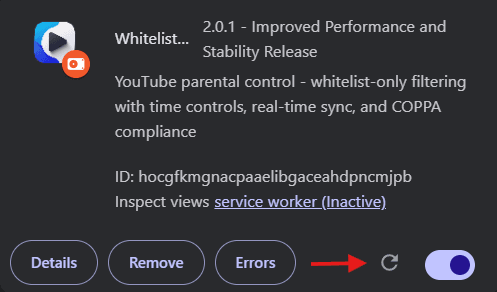
- Reinstall the extension:
- Remove WhitelistVideo from
chrome://extensions - Install it again
- Re-activate the device
- Remove WhitelistVideo from
Note: You'll need to activate the device again after reinstalling.
How to fix WhitelistVideo connection problems
Why won't the WhitelistVideo QR code scan?
Solutions:
- Make sure your phone camera can see the entire QR code
- Move closer to the screen
- Try better lighting
- Clean your phone's camera lens
Why do I get "Connection failed" message in WhitelistVideo?
Solutions:
- Check internet connection on both devices
- Try clicking the WhitelistVideo icon again to refresh the QR code
- Make sure you're scanning the code within 5 minutes
Why does my phone keep disconnecting from WhitelistVideo?
Solutions:
- Make sure the Parents' App stayed open during scanning
- Check your phone's internet connection
- Try signing out and signing back in to the Parents' App
How to fix Chrome-specific WhitelistVideo issues
Why is WhitelistVideo extension disabled after Chrome update?
Chrome updates can sometimes disable extensions.
Solution:
- Go to
chrome://extensions - Find WhitelistVideo
- Toggle it back On
For permanent protection, install Advanced Protection.
Why doesn't WhitelistVideo work in Chrome incognito mode?
By default, extensions don't work in incognito mode.
Solutions:
- Enable WhitelistVideo in incognito:
chrome://extensions→ WhitelistVideo → "Allow in incognito" - Or install Advanced Protection to disable incognito mode entirely
Still having issues?
Contact support at support@whitelist.video with:
- Your account email
- Chrome version (Menu → Help → About Google Chrome)
- Screenshot of any error messages