How to fix WhitelistVideo activation problems
Solve problems with activating WhitelistVideo protection on your child's device.
How to fix WhitelistVideo activation code problems
Why doesn't my WhitelistVideo activation code work?
Check the code format:
- Codes are 6 alphanumeric characters (letters and numbers, like A3B-X2Z)
- No spaces or special characters
- Letters are not case-sensitive (abc = ABC)
Check if it expired:
- Codes expire after 15 minutes
- Generate a new code in the Parents' App
Try again:
- Open the Parents' App on your phone
- Tap your child's name
- Tap "Activate Device" or "Add Device"
- Tap "Generate New Code"
- Enter the new code on the computer within 15 minutes
Where do I enter the WhitelistVideo activation code?
On the computer:
- Click the WhitelistVideo icon in Chrome's toolbar
- Click "Enter Activation Code" or "Activate"
- If you don't see this option, the device may already be activated
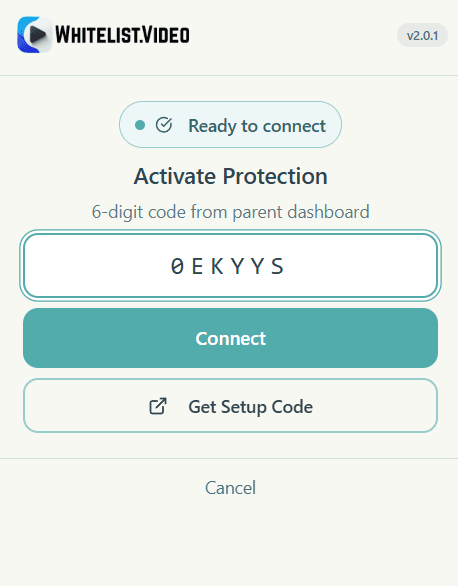
Why does my WhitelistVideo activation code keep expiring?
Solutions:
- Have both devices ready before generating the code
- Generate the code, then immediately enter it
- Make sure both devices have good internet connections
Tip: Keep your phone and the computer next to each other during activation.
Why does WhitelistVideo show "not activated" status?
Why does WhitelistVideo extension show "not activated" or "not protected"?
Try activating again:
- Open the Parents' App
- Go to your child's profile
- Generate a new activation code
- Enter it on the computer
Check for account issues:
- Make sure you're signed in to the Parents' App
- Verify the child profile exists
- Check that your subscription is active (if required)
Why does my previously activated WhitelistVideo device now show "not activated"?
Possible causes:
- The extension was reinstalled
- Chrome data was cleared
- Another user signed in to Chrome
Solution:
- Click the WhitelistVideo icon
- Click "Activate" or "Enter Code"
- Generate a new code from your phone
- Enter the code
Why isn't WhitelistVideo protection working after activation?
Why aren't videos being blocked after WhitelistVideo activation?
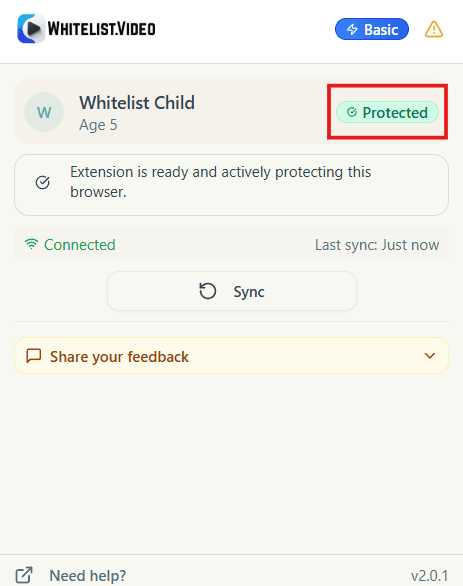
Verify protection is active:
- Click the WhitelistVideo icon
- Confirm it says "Protection Active"
- Check that a child profile is shown
Test the filtering:
- Go to YouTube
- Search for any video
- Try playing a video from an unapproved channel
- It should show a blocked message
If videos still play:
- Refresh the YouTube page
- Restart Chrome completely
- Make sure the channel isn't in your approved list
Why are some videos blocked by WhitelistVideo but others aren't?
Check your approved channels:
- Open the Parents' App
- Go to Approved Channels
- The video's channel might be on your list
Check Auto-pilot Screening:
- If Auto-pilot is on, it may be allowing some videos
- Try manually blocking the channel if you don't want Auto-pilot to allow it
How to fix WhitelistVideo child profile issues
Why can't I create a WhitelistVideo child profile?
Solutions:
- Check your internet connection
- Make sure you're signed in
- Try closing and reopening the Parents' App
Why is the wrong child profile connected to WhitelistVideo?
Solution:
- Open the Parents' App
- Go to the device settings
- Change which child profile is linked to the device
Why did my WhitelistVideo child profile disappear?
Solutions:
- Sign out and sign back in to the Parents' App
- Check if another parent removed the profile
- Contact support if the profile can't be recovered
Why is my device not showing in WhitelistVideo parents' app?
Why don't I see my activated device in the WhitelistVideo parents' app?
Wait a moment:
- It can take up to a minute for devices to appear
- Pull down to refresh the device list
Check the right profile:
- Open each child's profile
- Look under "Devices" or "Connected Devices"
Re-activate:
- The activation may have failed
- Generate a new code and try again
How to fix WhitelistVideo multiple device issues
Can I activate the same WhitelistVideo profile on multiple devices?
Yes, but only one device can be active at a time. You can activate the same child profile on multiple computers (e.g., home desktop and laptop), but when your child opens the browser on a different device, they'll be automatically logged out from the previous one.
This helps ensure:
- The active browser session uses the expected child profile
- You always know which device is currently active
- Channel approvals sync across all activated devices
Does each computer need its own WhitelistVideo activation code?
Yes. Generate a new activation code for each device you want to set up.
Why was my child logged out of WhitelistVideo on their other computer?
This is expected behavior. WhitelistVideo allows only one active device per child. When your child uses the extension on a different computer, they're automatically signed out from the previous device. This prevents bypassing filters by using multiple devices simultaneously.
Still having issues?
Contact support at support@whitelist.video with:
- Your account email
- The child profile name
- What step failed
- Any error messages