Frequently asked questions
Answers to common questions about WhitelistVideo parental controls for YouTube.
General questions
What is WhitelistVideo and how does it work?
WhitelistVideo is a parental control app for YouTube that blocks all videos by default and lets parents approve (whitelist) specific channels. Your child can only watch videos from channels you've approved—everything else stays blocked automatically.
How is WhitelistVideo different from YouTube Kids?
Scroll horizontally to see all columns.
| Feature | WhitelistVideo | YouTube Kids |
|---|---|---|
| Full YouTube access | Yes | No |
| Channel-level control | Yes | Limited |
| Works on computer browsers | Yes | No |
| Auto-pilot video screening | Yes (Premium) | Basic |
| Customizable for each child | Yes | Limited |
What devices and browsers does WhitelistVideo support?
Child device protection:
- Windows/Mac computers with Chrome or Edge (browser extension + desktop installer)
- Chromebooks with Chrome (browser extension)
- iPhone/iPad — iOS Child App (opens in a new tab)
- Android phones/tablets — Android Child App (opens in a new tab)
- Android TV — TV App on Google Play (opens in a new tab) (Curated Feed mode)
Parent management:
- Android — Parent App on Google Play (opens in a new tab)
- Any device — Web dashboard at app.whitelist.video (opens in a new tab)
Can I use WhitelistVideo on a school-issued Chromebook?
School-issued Chromebooks are managed by the school's IT department and typically don't allow installing extensions.
If you want WhitelistVideo on your child's school Chromebook: Contact us at support@whitelist.video and we can work with your school to provide WhitelistVideo for all students. Many schools are interested in YouTube filtering tools to keep students focused and safe.
When will Safari browser be supported?
For Mac computers, we recommend using Chrome or Edge, which support the enterprise policies used by the WhitelistVideo installer.
Safari does not use the Chrome/Edge extension policies. If Safari or another browser remains available, restrict it separately with Screen Time and test youtube.com from the child account.
For iPhones and iPads, use the WhitelistVideo iOS app from the App Store instead — no browser extension needed.
Our recommendation: Keep the child on a Standard account, install protection from a parent administrator account, and use Chrome or Edge. The installer protects those browsers; Screen Time can restrict alternative browser apps.
Does WhitelistVideo work on Microsoft Edge?
Yes. Microsoft Edge is built on Chromium, so the WhitelistVideo installer can enforce its extension policies in Edge. Keep the child on a Standard account so they cannot change administrator-protected settings.
What languages does WhitelistVideo support?
Both the Parent Dashboard app and the website are available in 7 languages:
- English
- Spanish (Español)
- Portuguese (Português)
- French (Français)
- German (Deutsch)
- Chinese (中文)
- Japanese (日本語)
To change your language in the app:
- Open the Parent Dashboard app
- Go to Settings
- Tap Language
- Choose your preferred language
The interface will update immediately. All notifications, messages, and the messaging bot (Telegram & WhatsApp) will respond in your selected language.
On the website: Use the language selector in the footer to switch languages.
Can I manage WhitelistVideo from WhatsApp or Telegram?
Yes! Our AI messaging bot gives you complete control from a chat conversation. Connect it from Settings > Connect Telegram or Settings > Connect WhatsApp.
What you can do:
- Add, remove, or list approved channels
- Create, edit, or delete child profiles
- Manage devices — rename, deactivate, remove, or pair new ones
- Add or reduce child slots on your subscription
- Manage playlists and content categories
- Block/unblock channels and keywords
- Adjust safety levels (strict, moderate, relaxed)
- Enable/disable Auto-pilot and YouTube Shorts blocking
- View activity summaries (24h, 7d, 30d)
- Approve or deny channel requests with one tap
- Manage your subscription and billing
The bot understands natural language in 7 languages — just message it like you'd text a friend: "add Khan Academy for my son" or "block gaming channels for my daughter."
Works on both WhatsApp and Telegram with identical features. See Messaging Bot for full details.
Is there a free test period for WhitelistVideo?
Yes. Every new account gets a free 2-hour test period so you can confirm WhitelistVideo works on your child's device — no credit card required. The timer starts when you activate the first device, not when you sign up.
What plans does WhitelistVideo offer?
Scroll horizontally to see all columns.
| Plan | Price | Best For |
|---|---|---|
| Basic | $6.99/mo or $69.99/yr | YouTube controls, WhatsApp/Telegram bot, Parents Community, up to 30 channels |
| Premium | $0.69 first month, then $14.99/mo or $119.99/yr | Everything in Basic plus Auto-pilot, categories, insights, co-parent access |
| Lifetime | $299.00 one-time | Everything in Premium forever, up to 5 children |
What features are included in WhitelistVideo Premium?
Premium includes everything in Basic, plus:
- Auto-pilot Screening (automatic video safety checking)
- Up to 100 approved channels per child (vs 30 on Basic)
- Up to 10 whitelisted playlists per child
- Category filtering
- Insights and reporting (7 / 30 days)
- Search-history monitoring
- Co-parent / partner access (2 parents)
- All future features
All paid plans (Basic, Premium, Lifetime) include:
- WhatsApp / Telegram notifications and control (28 actions)
- Access to the WhitelistVideo Parents Community
- YouTube engagement controls (Block Shorts, Hide Comments, Block Downloads)
Setup questions
How long does it take to set up WhitelistVideo?
Most parents complete setup in 5-10 minutes:
- Set up your child's profile via the onboarding wizard at whitelist.video/get-started (opens in a new tab) (2 minutes)
- Create your parent account (1 minute)
- Install the extension on your child's device (1 minute)
- Activate protection with the setup code (1 minute)
Do I need to install an app on my phone to use WhitelistVideo?
You have options! For the best experience, download the Parent App from Google Play (opens in a new tab) (Android). On iOS, use the web dashboard at app.whitelist.video (opens in a new tab) and add it to your home screen for an app-like experience.
Can I manage multiple children with one WhitelistVideo account?
Yes. Create a separate profile for each child. Each profile has its own approved channel list.
Can I use WhitelistVideo on multiple computers for the same child?
Yes. You can connect multiple computers to the same child profile. They'll all share the same approved channels.
Protection & security questions
Can my child bypass or disable WhitelistVideo?
Without Advanced Protection, tech-savvy children might:
- Disable the extension
- Use a different browser
- Use incognito mode
On desktop: Advanced Protection protects Chrome and Edge using enterprise browser policies. Keep the child on a Standard account and restrict alternative browser apps separately.
On iOS: Approve WhitelistVideo's Screen Time access so it can restrict YouTube through Safari and Chrome. Keep YouTube domains permitted, uninstall the regular YouTube app, restrict app deletion and installation, and use a child Apple ID for the strongest authorization.
On Android: Use Family Link where supported to block the regular YouTube app, restrict YouTube sites in Chrome, and control alternative browser apps. Do not assume it prevents every uninstall action.
Does WhitelistVideo protect YouTube in other apps?
WhitelistVideo provides YouTube protection across all major platforms:
- Desktop (Chrome/Edge): The browser extension filters YouTube content in real time. The installer protects Chrome and Edge; use Family Safety on Windows or Screen Time on Mac to restrict alternative browser apps.
- iOS (iPhone/iPad): The child app filters approved YouTube content. After Screen Time access is approved, WhitelistVideo restricts YouTube through Safari and Chrome. Keep YouTube domains permitted so approved videos can play inside WhitelistVideo.
- Android: The Android child app provides a filtered YouTube player.
- Android TV: The TV app provides a curated feed of approved content.
Can my child use multiple devices at the same time?
For the browser extension, only one device can be active per child at a time. If your child opens the browser on a different computer, they'll be automatically logged out from the previous device.
However, mobile apps and the TV app can be active simultaneously alongside the browser extension. For example, your child can have the iOS app on their iPad, the Android TV app on the television, and the Chrome extension on their laptop — all active at the same time with the same child profile.
You can activate the same child profile on multiple computers for the extension (e.g., home desktop and laptop), but only one browser extension session can be actively protected at any moment. This prevents bypassing filters by switching devices.
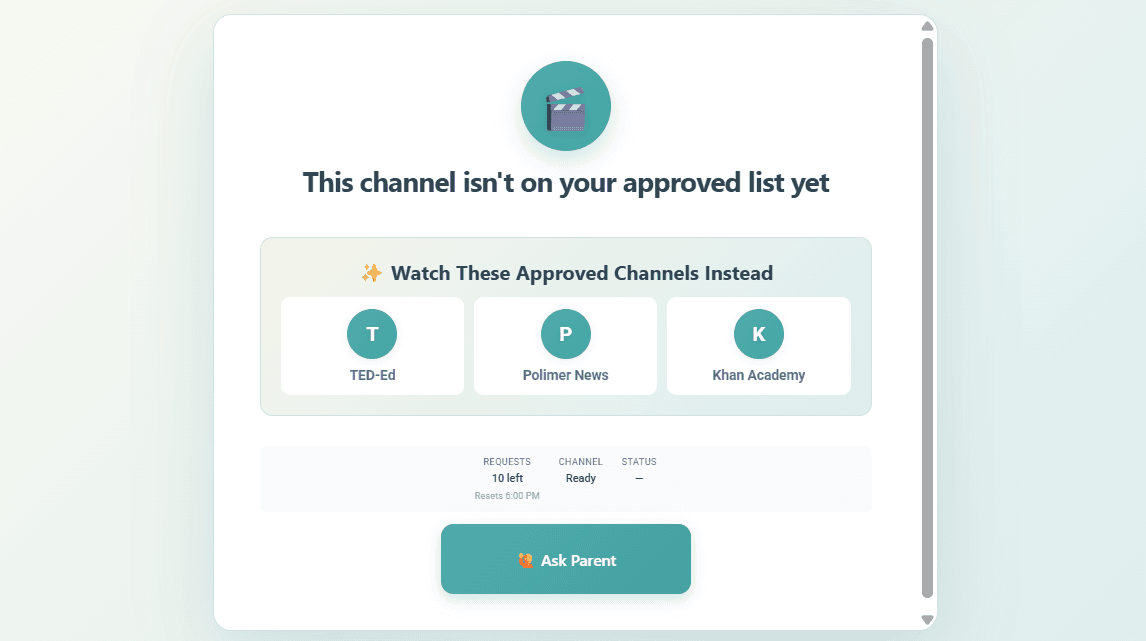
What does my child see when a video is blocked?
Your child sees a friendly overlay message. The exact message depends on whether Auto-pilot content screening is enabled:
Without Auto-pilot:
"This channel isn't on your approved list yet"
With Auto-pilot:
"Auto-pilot: Content Not Appropriate"
Both screens show:
- "✨ Watch These Approved Channels Instead" - Clickable cards showing their approved channels
- Request limits - Shows how many requests remain (e.g., "10 left, Resets 6:30 PM")
- "Ask Parent" button - Sends a request to you for approval
Does WhitelistVideo block YouTube Shorts?
Yes, YouTube Shorts can be blocked using the Block YouTube Shorts toggle in Player Controls. This feature requires a Basic or Premium plan. We strongly recommend keeping this enabled—research shows that short-form, rapid-fire content can negatively impact children's attention span and focus.
What do the WARNING and UNPROTECTED alerts mean on my dashboard?
These alerts indicate the browser extension hasn't communicated with our servers recently:
Scroll horizontally to see all columns.
| Alert | Time Since Check-in | Meaning |
|---|---|---|
| WARNING (amber) | 24-72 hours | Device may be offline |
| UNPROTECTED (red) | 72+ hours | Device likely unprotected |
Common causes: browser closed, device off, no internet. To resolve, open Chrome/Edge on your child's device and visit YouTube. See Device Status Alerts for detailed troubleshooting.
Channel management questions
How do I choose which YouTube channels to approve for my child?
- During onboarding, use the interest picker and channel recommendations to build your initial list
- Start with channels your child already watches
- Use the suggestions in the Parents' App
- Add channels as your child requests them
Can I approve entire content categories instead of individual channels?
Yes, with Auto-pilot content screening (Premium feature). You can enable categories like Educational, Science, Music, Gaming, etc. Videos from non-approved channels that match your enabled categories will be allowed. See Auto-pilot Screening for details.
For maximum control, you can also approve individual channels manually.
Can I approve individual videos instead of whole channels?
No. WhitelistVideo works at the channel level, not the video level. Approving individual videos doesn't scale—parents would need to review thousands of videos, which isn't practical. Channel-level approval combined with Auto-pilot content screening provides the right balance of safety and convenience. You can also whitelist YouTube playlists (Premium) to approve curated collections of videos.
Can I whitelist YouTube playlists?
Yes! Playlist whitelisting is available on the Premium plan. You can approve entire YouTube playlists so your child can watch all videos in the playlist — great for educational collections or curated content. Premium users can add up to 10 playlists per child. See Playlists for details.
How do I remove a channel from my child's approved list?
You can remove any channel from the approved list:
- Open the Parents' App
- Go to Approved Channels
- Find the channel and tap Remove
The change takes effect immediately.
Auto-pilot content screening questions
What does WhitelistVideo's Auto-pilot analyze to determine if a video is safe?
Auto-pilot analyzes:
- Video title and description
- Channel reputation
- Video metadata and tags
- Content category
Does WhitelistVideo's Auto-pilot actually watch the video content?
No. Auto-pilot uses metadata to make quick decisions. It doesn't watch the video content itself.
Can I override WhitelistVideo's Auto-pilot decisions?
Yes. If Auto-pilot blocked a channel you trust, approve it manually. If Auto-pilot allowed a channel you don't want, block it manually.
Does WhitelistVideo's Auto-pilot work for non-English YouTube videos?
Yes. Auto-pilot is multilingual and can analyze content in most languages. It checks video metadata, titles, and descriptions regardless of language.
Technical questions
Does WhitelistVideo slow down YouTube?
No noticeable slowdown. Filtering happens in milliseconds.
Does WhitelistVideo work without an internet connection?
No. WhitelistVideo needs an internet connection to:
- Check if channels are approved
- Run Auto-pilot Screening (Premium)
- Sync with the Parents' App
Will WhitelistVideo break any YouTube features?
No. YouTube works normally. Your child can search, browse, and watch videos from approved channels.
Does WhitelistVideo work with Chrome profiles?
Yes. Install the extension in your child's Chrome profile for best results.
Account & billing questions
How do I change my WhitelistVideo password?
- Open the Parents' App
- Go to Settings → Account
- Tap "Change Password"
- Follow the prompts
How do I cancel my WhitelistVideo subscription?
- Open the Parents' App
- Go to Settings → Subscription
- Tap "Cancel Subscription"
You'll keep access until the end of your billing period.
Can two parents share one WhitelistVideo account?
Yes. Sign in with the same email and password on multiple phones.
What happens to my data if I cancel WhitelistVideo?
Your data is kept for 30 days after cancellation. You can reactivate and restore your settings during this time.
Still have questions?
Contact us at support@whitelist.video
We typically respond within 24 hours on business days.